Tips For your Instagram bio in 2021 to increase your redbubble traffic
Tips For your Instagram bio in 2021 to increase your redbubble traffic:

Your Instagram bio is like the door. You’re letting people in(follow you) through this door. And it’s a great way to convert Instagram visitors into followers.
Ready to learn what it takes to create a killer Instagram bio?
Follow down below and read the tips
Tip No 1:
who you are? Talk about yourself, what do you do? What does this account provide?
And the best way to introduce yourself and write about yourself or your services is through the name field.
The name field is the Instagram new keyword search tool, using targeted keywords instead of your username or your real name in this field. This is a great strategy for your brand to be more visible.
For example in my Instagram account, I wrote: POD designer (pod stands for print on demand). SO if someone searches for (pod designer) on Instagram the chances that my account will pop up is very high.
Tip No 2:
Who do you help? And How?
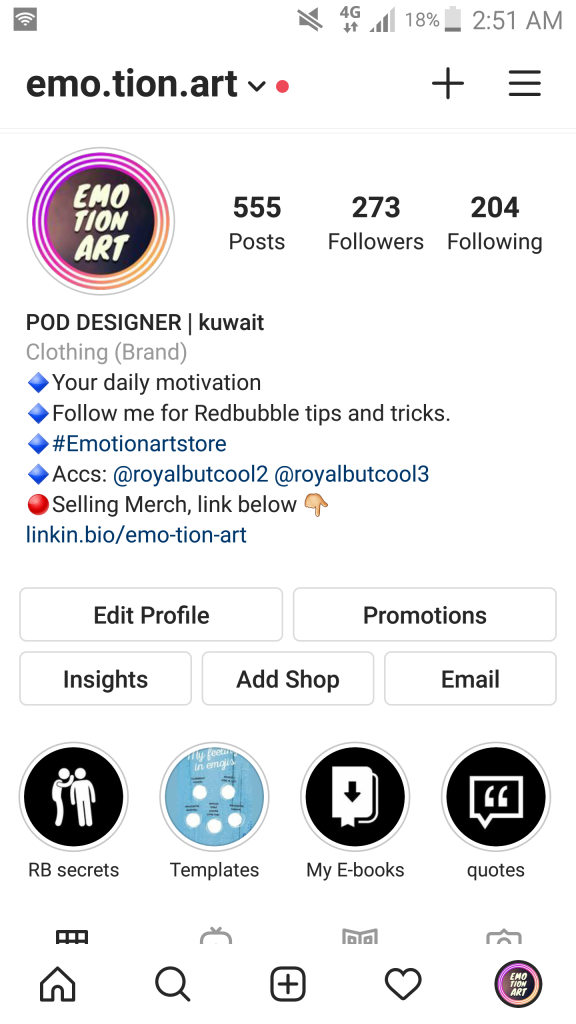
For example, in my account, I wrote your daily motivation that’s because my account provides daily motivational quotes, especially for small business owners. Also, I provide redbubble tips and tricks that will help redbubble sellers increase their sales.
Tip No 3:
Tag related accounts and share your brand’s hashtags
Tag your other Instagram accounts, I have two other accounts besides the one above I tagged them all. It gives me the ability to promote my other brands. Add your brand’s name hashtag into your Instagram bio and make sure you use it in each post you post. In this way, you can let others participate.
Tip no 4:
drive traffic by adding your link
I see a lot of Instagram pages not adding their redbubble link to their bio.
Or sometimes they write the link within the bio which makes it non-clickable.
So make sure you put your link or destination link in the right place. See pic down below
Go to edit profile >>On the website field write your link.

Tip No 5:
add Call-To-Action
Since Instagram only gives you one link it’s better to tell users what’s in it for them if they click your link. For example, I told my followers that I’m selling merch and if they wanted to buy my products link is down below with an emoji
Also, another way to use CTA is by writing for example follow me on Instagram for pod tips and tricks, or designs hacks…etc. In this way, you include tip No 1, 2 in terms of who you are? What you do? And How you help? You always need to give people a reason to follow you.
Tip NO 6:
Another way to add CTA without using extra space in your bio
add your contact details by switching to an Instagram business account profile. You could choose to include your email address, phone NO, and physical address without having to use any character space in your bio.
You can also choose your brand category that will appear underneath your name field. Making it even easier for people to know what you do.
Tip No 7:
choose perfect instagram profile
Either through using your logo, or shortened version of your logo.
Bonus Tip: If you want your profile pic to stand out even further add an outline to it.
By Using this app :

By adding a red or orange circle around your profile pic, your image stands out from others when you have a new Instagram story.

Tip No 8:
Instagram highlights story
Use Instagram highlights as a reference or table of contents. Put only important things like posts you want your followers to reach them easier. Or maybe special products you sell.
Tip No 9 :
Finally
Add highlights covers
Either keep it simple by adding on-brand colors or using icons and designing them you can easily use canva or Adobe spark on your phone
Mine was created by Adope spark.
I hope you find this post useful. And let me know down below , Which tip you aren’t applying yet?
For more Follow me on instagram account Emo.tion.art
And follow my blogging page.
stay safe!!


Comments
Post a Comment